
Online Document Verification Software | Verify & Detect Fraud with AI
Document fraud is harder to spot and easier to scale. What used to be crude edits now includes subtle manipulation, reused templates, and entirely fabricated files designed to pass basic checks. For fraud teams reviewing volumes of financial statements, manual review alone is no longer reliable or accurate.
Table of Contents
[ show ]- Loading table of contents...


Online document verification shouldn’t stop at selfie-to-photo ID matching. In real workflows, the highest-value fraud shows up in the documents themselves: forged bank statements, fabricated pay stubs, edited tax forms, and manipulated invoices that “look clean” in a quick scan. Most online document verification solutions stop at identity checks; Inscribe goes further by verifying the documents themselves and detecting fraud that identity-only tools miss.
Inscribe is AI-powered online document verification software that verifies identity documents and the financial documents identity-only tools can't authenticate, giving financial institutions a reliable online verification layer for high-stakes decisions. You can verify passports, driver's licenses, and national IDs and then apply forensic-grade analysis to bank statements, utility bills, pay stubs, tax forms, and invoices to catch forged, fabricated, and manipulated files in real time. This same forensic approach powers Inscribe's broader automated document fraud detection software, applied here specifically to the verification step of onboarding and underwriting.
Inscribe has been purpose-built for document risk screening since 2017, trusted by leading banks, fintechs, and lenders, and is SOC 2 Type II and ISO 27001 certified. It’s the document verification solution your team can defend with regulators and internal audit. To see the full workflow end-to-end, explore the Demo Center.
What is it?
AI-Powered Document Verification That Goes Beyond Identity Checks
Most “online document verification” solutions focus on identity proofing by confirming a person’s identity with facial recognition, liveness detection, and selfie-to-photo ID matching. That’s useful, but it leaves a major blind spot: someone can pass identity checks and still submit a forged bank statement or AI-generated tax form.
Inscribe goes further. It’s an automated document verification solution that authenticates, extracts, and analyzes both identity documents and financial documents so your team can verify documents online without relying on manual review or gut instinct.
How do you verify a document is original? You don’t rely on appearance alone. You verify authenticity by evaluating the document’s integrity (signs of editing), provenance (how it was created/submitted), and consistency (whether it matches known-good templates and supporting documents). This turns every submission into a repeatable document validation step, not a subjective visual check. That’s exactly what Inscribe is built to do.
What problem does it solve?
Faster decisions with stronger fraud protection
Document-based fraud creates risk and slows operations. When fraudulent documents pass early review, the impact is harder and more expensive to unwind.
- Manual verification does not scale. Manual review can take 10 to 15 minutes per document and results vary by reviewer experience, workload, and fatigue. As volume increases, approvals slow or shortcuts increase. This manual verification model introduces human error, slows operational efficiency, and creates customer frustration when they are kept waiting.
- Identity verification alone is not enough.
Selfie to ID matching does not verify whether a bank statement, pay stub, or tax document is authentic. Fraudulent documents can be paired with genuine identities, enabling identity theft and misuse of stolen documents to slip past identity-only checks. - Fraud tactics are evolving quickly.
Editing tools, templates, and generative AI make fabricated documents easier to create and reuse. Patterns repeat across repeat attempts and are difficult to spot when documents are reviewed one at a time. - Compliance requires defensible decisions.
KYC, KYB, and AML programs require consistent documentation and clear evidence. Verification should produce outputs that support audit review.
If you want a current view into how document-based fraud is evolving, the 2026 Document Fraud Report is a strong reference point.
Document Verification Use Cases
Built for high-stakes workflows
Income verification for consumer lending
Verify bank statements and pay stubs during loan origination so approvals are based on real financial picture, not manufactured inputs. Inscribe helps surface inflated income, fabricated deposits, inconsistent pay cadence, mismatched employer details, and suspicious patterns across pages or documents before approval.
Business loan underwriting
Validate financial documents at scale while keeping review standards consistent across document types and institutions. Inscribe supports faster underwriting by extracting and interpreting complex statements, flagging inconsistencies across multi-page submissions, and highlighting signals that suggest manipulation, fabrication, or selective omission.
KYC and KYB onboarding
Authenticate identity documents and business documents during onboarding and due diligence, including IDs, proof of address, business registrations, and supporting financial documents. Inscribe helps identify forged and misused documents, mismatched identity details across a document set, and submissions designed to bypass compliance checks.
Tenant screening
Verify bank statements, proof of address, and income documents submitted by rental applicants, especially in workflows where application volume is high and manual review varies by reviewer. Inscribe helps flag fake statements, altered balances, missing pages, inconsistent address history, and submissions that look legitimate on the surface but do not hold up under deeper verification. By automating document verification, you prevent fraud from fake bank statements and utility bills before they impact your portfolio.
Insurance claims verification
Confirm legitimacy for invoices, receipts, medical records, and repair estimates where small edits can materially change claim value. Inscribe can surface altered totals, fabricated providers, duplicated templates, inconsistent dates or line items, and patterns that suggest repeat submissions across claims.
Marketplace and platform trust
Validate merchant, seller, or partner documents during onboarding and ongoing compliance reviews, including business registrations, bank statements, and proof of address. Inscribe helps identify template reuse, inconsistent business details, suspicious document history, and repeat attempts that indicate elevated risk before access is granted.
More industry context is available for Banks, Lenders, and Credit Unions.
Who is online document verification for?
Online document verification is designed for teams responsible for fraud exposure, compliance posture, and operational throughput. It’s built for financial institutions and other regulated industries where document verification must protect genuine customers without adding unnecessary friction.
Common teams include:
- Fraud analysts and fraud operations
- Compliance teams focused on KYC, KYB, and AML and broader compliance requirements in regulated industries.
- Risk leaders setting thresholds and review strategy
- Credit operations teams managing queue health
- Underwriters validating applicant documents
- Property management teams screening tenants
- Product and engineering teams building onboarding workflows
How does Inscribe’s online document verification work?
AI-powered verification in 4 steps
This is Inscribe’s document verification process, not a generic description of document capture
1) Submit a document
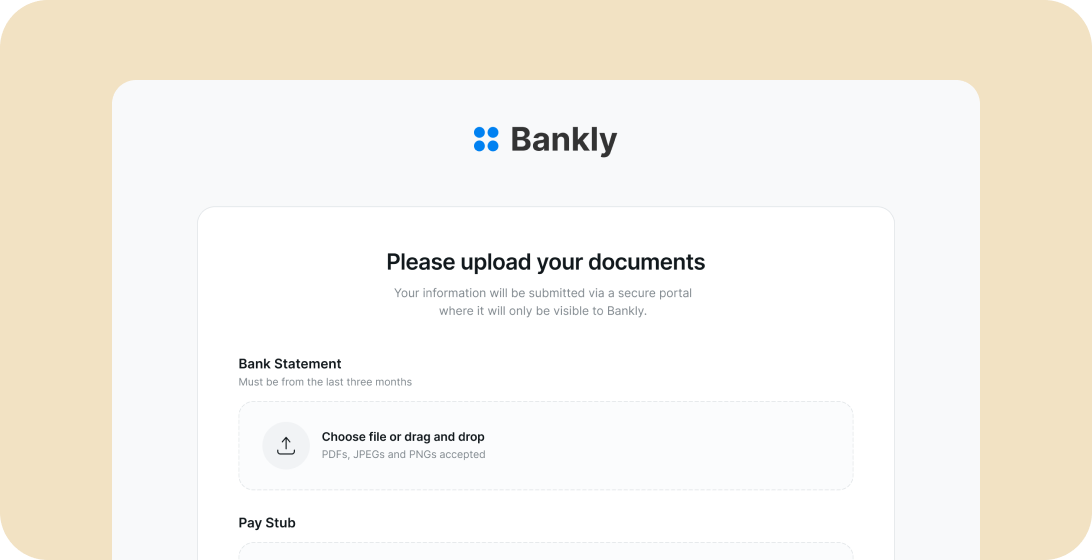
Documents can be uploaded directly, connected via API, or requested through Secure Document Collection. Capture-quality checks help reduce rework by detecting blur, glare, poor lighting, cropped edges, and missing pages.
2) Extract and parse
Inscribe combines optical character recognition (OCR) with LLM-based parsing and machine learning technology trained on financial documents. It interprets tables, layouts, and cross-page relationships to support accurate data extraction from multi-page statements and complex forms. Integration options and documentation are available at docs.inscribe.ai.
3) Validate and detect fraud
Inscribe does not rely on format checks alone. It turns validation into automated document validation, running forensic analysis to verify documents online and surface manipulation and fabrication signals that are often missed in manual review.
Signals can include:
- Metadata inspection such as creation tools, timestamps, and software signatures
- Font anomaly detection
- Pixel-level image analysis
- Revision history extraction through Document X-Ray
- Network-based comparisons across tens of millions of analyzed documents
- Cross-document corroboration to surface contradictions and omissions
For identity documents, Inscribe supports checks such as MRZ validation, barcode validation, and country-specific format checks. Document X-Ray provides a direct way to assess whether a PDF has been edited by revealing revision history and change indicators.
4) Review and decide
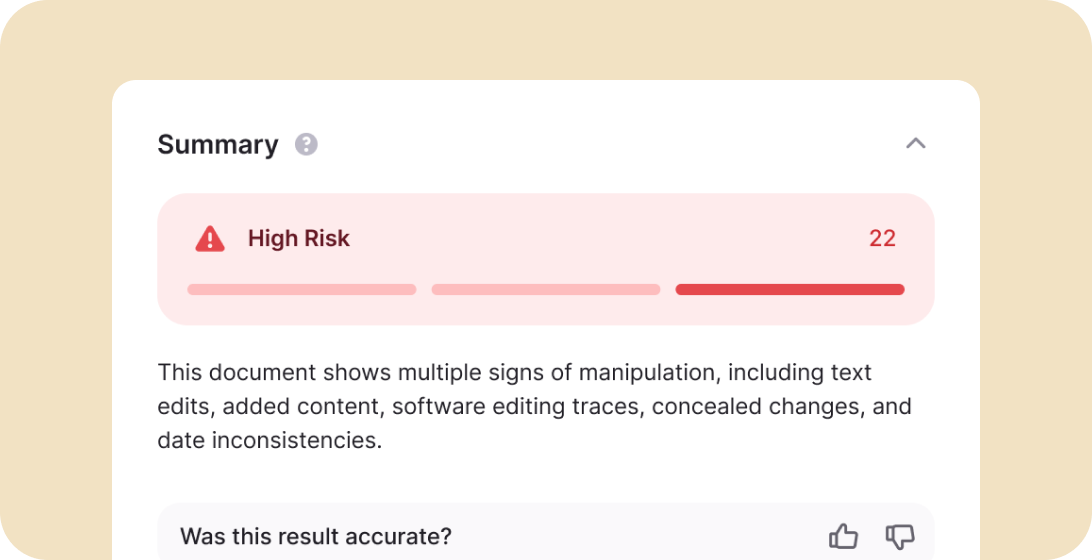
Results are returned in a structured format including a Trust Score (0 to 100), severity levels, visual signals, event type indicators, and plain-language summaries. On average, documents are reviewed in about 72 seconds compared with 10–15 minutes for manual review, dramatically improving operational efficiency. High-risk or low-confidence documents can be routed to human review automatically. A walkthrough is available in the AI Fraud Analyst demo.
Key Features of Inscribe’s Online Document Verification Software
Document X-Ray: see what was changed
Document X-Ray reveals revision history signals that can be invisible during manual review. It shows what changed, what was originally there, and when changes occurred. This supports audit-ready verification decisions, especially for PDFs and scanned documents. These forensic checks go far beyond what typical document verification solutions provide and are critical for detecting fraudulent documents created with modern editing tools.
Risk Score and natural language summaries
Inscribe pairs a Risk Score with plain-language explanations that clarify what was flagged and why it matters. This reduces reviewer workload, improves consistency, and turns Inscribe into a document verification solution your reviewers and auditors can actually understand and trust..
Network-based intelligence
Incoming documents can be compared against patterns observed across a large document network. This helps identify repeated templates, unusual metadata combinations, and structural inconsistencies.
AI-powered parsing and data extraction
LLM-based parsing interprets content in context, supporting detection of manipulated values, cross-page inconsistencies, and contradictions that can hide inside otherwise plausible documents. By combining OCR-based data extraction with machine learning, Inscribe understands not just text but document type, structure, and context.
Web-based research and cross-document corroboration
External validation and cross-document comparisons help surface inconsistencies more quickly and reduce manual research time.
Secure Document Collection
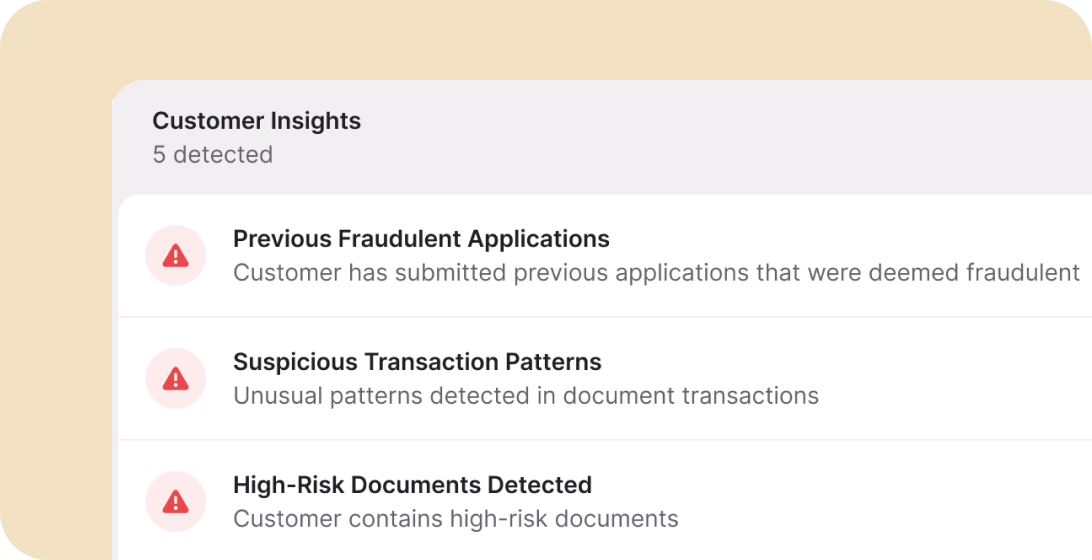
Secure Document Collection replaces email-based collection with secure links that route documents into verification. It supports cleaner chain of custody and fewer missing pages.
Identity document support
Inscribe verifies identity documents like passports, driver’s licenses, national ID cards, residence permits, and other government issued IDs, with MRZ checks, barcode validation, liveness detection, and facial recognition where supported. But unlike identity-only competitors, Inscribe also verifies the financial documents, like bank statements, utility bills, pay stubs, tax forms. Identity checks alone can’t authenticate these.
What is the value of online document verification?
Online document verification delivers value when it reduces fraud losses, shortens review cycles, and keeps decisioning consistent.
Fraud losses prevented
Early detection prevents downstream losses and reduces operational rework. Matt Overin, Manager, Fraud Risk Management at Logix Federal Credit Union notes that “Today, with the internet and sophisticated tools to create any document you want, we really need something we can trust to look beyond what my investigators can see with the naked eye."
Faster document review
Automating first-pass analysis reduces manual effort and helps teams focus on exceptions and high-risk files. Customers typically see document review become 50% faster, with average review times around 72 seconds.
Fewer false positives
Forensic signals and network context help distinguish genuine documents from manipulated or fabricated ones, reducing unnecessary escalations.
Improved conversion and customer experience
Faster verification reduces friction so onboarding feels smoother for genuine customers while still preventing fraud.
Compliance-ready auditability
Trust Scores, evidence signals, and explainable summaries support internal reviews and audit needs. Read more about security posture details and legal and privacy.
How to choose online document verification software
Online document verification software should fit your workflow, your document mix, and your review model. For most teams, that means better operational efficiency, less customer frustration, and fewer false positives in your onboarding process. As you evaluate document verification solutions, the biggest divide is between identity-only tools and platforms like Inscribe that perform forensic-grade analysis on the documents themselves. The right solution makes verification faster without creating new bottlenecks, and it produces outputs your team can defend.
- Start with your document mix: Not all tools handle the same document types equally. Confirm the solution supports the documents you rely on most, including financial documents such as bank statements, pay stubs, tax forms, invoices, and proof of address documents. Inscribe supports both identity documents and high-risk financial documents, so you don’t need a separate document verification solution just for PDFs and statements.
- Look for evidence, not just alerts: Verification should provide clear supporting signals that explain why a document was flagged. Strong evidence reduces reviewer guesswork, improves consistency across the team, and supports audit review.3
- Evaluate how results flow into decisions: A tool can be accurate and still slow you down if it is hard to operationalize. Look for configurable routing that supports thresholds, exceptions, and escalation workflows, so reviewers spend time where it matters most.
- Confirm integration and implementation readiness: Online verification should integrate cleanly into existing systems and onboarding flows. API-first integration and webhook workflows reduce implementation effort. Integration documentation is available at docs.inscribe.ai.
- Validate security, privacy, and governance: Verification involves sensitive data, so security and governance matter. Look for proven controls around retention and privacy, and confirm the vendor’s security posture aligns with your standards and their broader approach to building defensible decisions.
Integration, APIs, and Getting Started
Inscribe supports common integration patterns for online verification:
- REST endpoints for document submission and results
- Webhook support for real-time events
- Structured outputs for downstream systems
Technical documentation is available at docs.inscribe.ai and you can experience a guided walkthrough in the Demo Center.
Implementation Checklist
✓ Perform a privacy impact assessment
✓ Define data retention and deletion policies
✓ Configure API endpoints, webhooks, and callback events
✓ Set SLAs and KPIs such as review time, escalation rate, and false positives
✓ Define thresholds for Trust Score-based routing
✓ Map exception handling for inconclusive results
✓ Train teams on signals, summaries, and escalation criteria
✓ Establish audit trail requirements aligned with KYC, KYB, AML, and GDPR
Compliance, Audit Trails, and Data Security
Verification should produce consistent, auditable evidence.
- Audit trails: Verification outputs can be logged with timestamps, scores, signals, and summaries.
- Retention and deletion controls: Configurable retention policies support privacy requirements, including GDPR-related requests where applicable.
- Certifications: Inscribe maintains SOC 2 Type II and ISO 27001 certifications.
Ready to verify documents and detect fraud at scale?
Reduce fraud risk without adding friction.
👉 Explore the Demo Center
👉 Get started with your free trial
👉 Learn more about AI fraud detection
Frequently Asked Questions

Online document verification uses AI and automation to confirm a document is authentic, unaltered, and suitable for decisioning without in-person review. It replaces subjective, manual checks with consistent analysis across every submission. Inscribe verifies identity and financial documents and returns explainable outputs in seconds, including a Trust Score, supporting signals, and plain-language reasoning.
Inscribe follows four steps: submit a document, extract and parse content, validate and detect fraud signals, then review results. The platform combines capture-quality checks, OCR, LLM-based parsing, and forensic analysis, then returns a Trust Score (0–100), severity levels, evidence signals, and plain-language summaries that help teams decide quickly and document the rationale. And it’s fast. The average processing time is about 72 seconds per document.
Authenticity can be verified by evaluating integrity signals (signs of editing or manipulation), provenance signals (how and when a file was created and submitted), and consistency signals (whether the content and structure align with known legitimate formats and with supporting documents). Inscribe combines Document X-Ray, network comparisons, and context-aware parsing to surface these signals and explain what they mean.
Identity verification confirms who a person is, typically through selfie-to-ID matching and liveness checks. Document verification confirms that a document is authentic and unaltered, even when it looks legitimate at a glance. Both are important. Inscribe supports identity documents and the financial documents that often drive risk decisions, so verification does not stop at identity alone.
Yes. AI can identify manipulation and fabrication signals that are difficult to spot in manual review, including metadata inconsistencies, font anomalies, pixel-level edits, formatting drift across pages, and template reuse across submissions. Inscribe applies forensic analysis and network intelligence to surface these signals and provide clear explanations for review and audit purposes.
A PDF can be evaluated through revision history, file metadata, and forensic indicators that suggest manipulation. Inscribe’s Document X-Ray surfaces change indicators and supporting signals such as unexpected creation tools, edit history signatures, and inconsistencies that point to modification, even when the document looks clean on the surface.
Common document types include identity documents (passports, driver’s licenses, national IDs), proof of address (utility bills), income documents (bank statements, pay stubs), tax forms, invoices, and other supporting business documents. Inscribe supports identity and financial document types commonly used in onboarding, underwriting, and compliance workflows.
It reduces the amount of manual review required and makes decisions more consistent, but it does not eliminate human judgment. AI handles routine verification at scale and flags exceptions with clear evidence, while manual review remains important for complex, high-risk, or ambiguous cases that require escalation.
Yes. Inscribe is API-first, supports webhook-based workflows, and can integrate into onboarding flows and risk systems so verification results can be used for routing and decisioning. Technical documentation is available at docs.inscribe.ai.
Use document checks, then review file history and file details. For higher-risk workflows, real-time analysis shows what was flagged and supports confidence in decisions.
About the author
Stephanie Spangler is the Head of Product Marketing at Inscribe, where she covers AI-powered fraud detection, document risk, and how financial institutions are adopting agentic AI. She writes on the intersection of product and practice — translating what fraud detection technology does into what it means for the risk teams using it.
Learn More
Dive deeper into our Solutions


What will our AI Agents find in your documents?
Start your free trial to catch more fraud, faster.